Free job application tracker template (Excel and Google Sheets)
 Xiang (Arnold) Shang · · updated · 4 min read
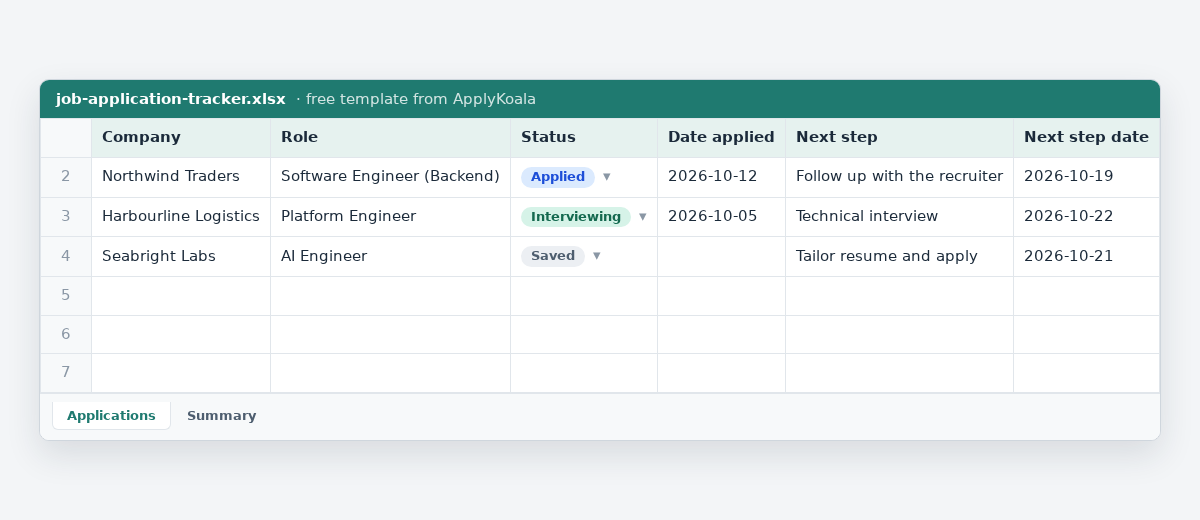
Short answer: download the template below, delete the three example rows, and add one row each time you apply. It has the columns worth keeping, a status drop-down, a frozen header, filters and a Summary tab that counts your applications for you. Free, no sign-up, nothing to install.
Download the template
- Copy the job application tracker to your Google Sheets: one click, with the drop-down and the Summary tab. You need a Google account.
- Job application tracker for Excel (.xlsx): the standard version, 12 columns and a Summary tab.
- Detailed version for Excel (.xlsx): adds location, work mode, pay range, visa sponsorship and interview dates.
- Job application tracker as CSV: the standard columns only, for any spreadsheet app.
Excel version
Open the .xlsx file in Excel. The header row stays put when you scroll, every column has a filter, and the Status column has a drop-down with the six stages a job goes through. The Summary tab counts each status and works out your reply rate as you fill in the Applications tab.
Google Sheets version
Make a copy in Google Sheets: Google asks you to confirm, then puts your own copy in your Drive. Nobody else can see what you write in it. The status drop-down and the Summary tab come with it.
You can also open sheets.new, then File → Import → Upload, and choose the .xlsx file. If you prefer, import the CSV instead and add the drop-down yourself with Data → Data validation.
What is in it
| Column | What to write |
|---|---|
| Company | The name you would say out loud. |
| Role | The exact title from the posting. |
| Status | Saved, Applied, Interviewing, Offer, Rejected or Withdrawn (pick from the list). |
| Date applied | The day it left your hands. |
| Next step | One line: “Follow up with the recruiter”, “Interview Thursday 10:00”. |
| Next step date | When that next step is due. Sort by this column every week. |
| Source | Job board, company site, or the person who sent it. |
| Resume sent | Which version, if you keep more than one. |
| Contact | The recruiter or hiring manager, if you know who it is. |
| Posting link | Where you found it. |
| Posting text | Paste the whole posting. Postings get taken down, usually before your interview. |
| Notes | Anything else. |
Why these and not more: most tracking spreadsheets die of too many columns. If you apply to a lot of jobs, the detailed version adds five more: Location, Work mode (on-site, hybrid or remote), Pay range, Visa sponsorship (whether the posting says it, or whether you still need to ask) and Interview dates. The reasoning behind each one is in Keeping track of job applications.
What the Summary tab shows
| Line | What it counts |
|---|---|
| One line per status | How many applications are Saved, Applied, Interviewing, Offer, Rejected or Withdrawn. |
| Sent | Everything except Saved: applications that actually went out. |
| Heard back | Interviewing, Offer and Rejected together. |
| Reply rate | Heard back divided by Sent. Watch how it changes when you change your resume or the roles you apply to. |
A weekly review in fifteen minutes
- Sort by Next step date. Anything in the past is waiting on you: do it, or change the date to a real one.
- Filter Status to Applied. Anything older than four weeks with no reply: note it and stop counting it as live.
- Anything to follow up? One short email to a person, not three messages in three places. There are templates for that.
When a spreadsheet stops being enough
A spreadsheet is the honest default, and for twenty applications it is all you need. It starts to strain when you paste in long postings, keep several resumes, want to remember what you said to each recruiter, or apply to dozens of jobs a week.
That is why I built ApplyKoala: the same columns, but you paste a posting and it fills in the company, role and details for you, keeps the full text, and a free Chrome extension fills in the application form. It is free and keeps everything in your browser. If you work with Claude Code or Codex, your AI can keep it up to date for you.
You can move from the spreadsheet any time; nothing about the template locks you in. When you do, your AI can move every row in one message, with the day you applied and the day each answer came.
Questions
Is the template really free? Yes. No sign-up, no email, no watermark. Change it however you like.
Excel or Google Sheets? Either. The .xlsx file opens in Excel, Google Sheets, LibreOffice and Numbers. The CSV has the same columns without the drop-down.
How many columns should a job tracker have? As few as you will keep filled in. If a column is empty for most rows after two weeks, delete it.
Does the template work in Google Sheets? Yes. Use the “make a copy” link to get your own copy in one click, or import the .xlsx file. The drop-down and the Summary tab come with it.
Is there a version with more columns? Yes, the detailed version adds location, work mode, pay range, visa sponsorship and interview dates.
Everything here works on paper. If you would rather not keep the paper,the app does this bit — paste a posting and it fills in the details, and it all stays on your own computer.